Accept crypto payments in your shop.
Paid straight to your wallet.
Set your price in your own currency, any of 165. Your customer picks BTC (on-chain or Lightning), USDC, USDT, EURC, SOL or ETH, scans one QR code and pays you directly. send21 never holds your money. One API covers your webshop, your counter and customers who shop through an AI agent.
One API, three ways to get paid
In your webshop
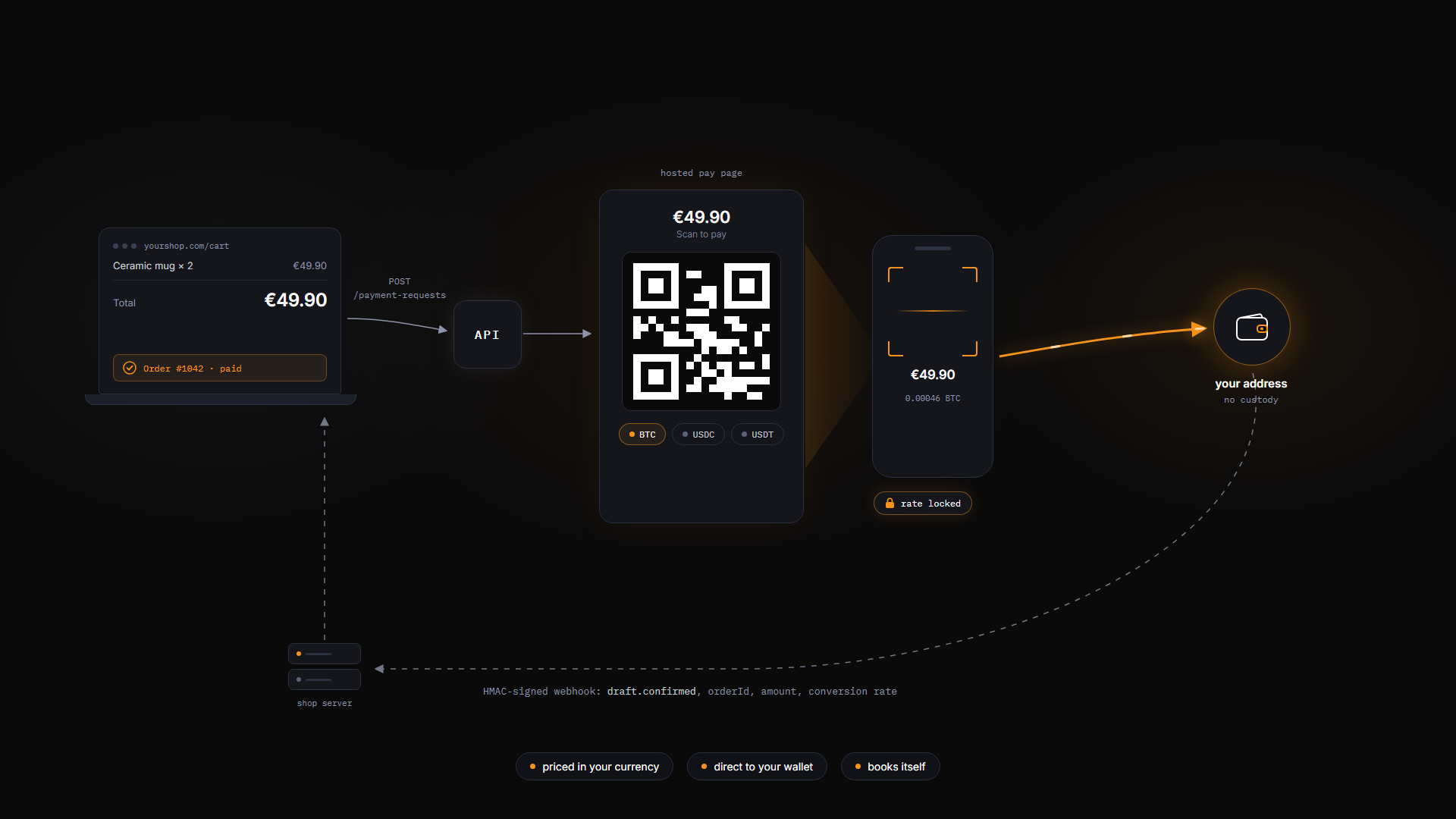
One API call at checkout returns a hosted pay page and QR code. The customer pays your price at a locked rate, straight to your address. A signed webhook with your order id, the amount and the rate tells your shop the order is paid.
At the counter
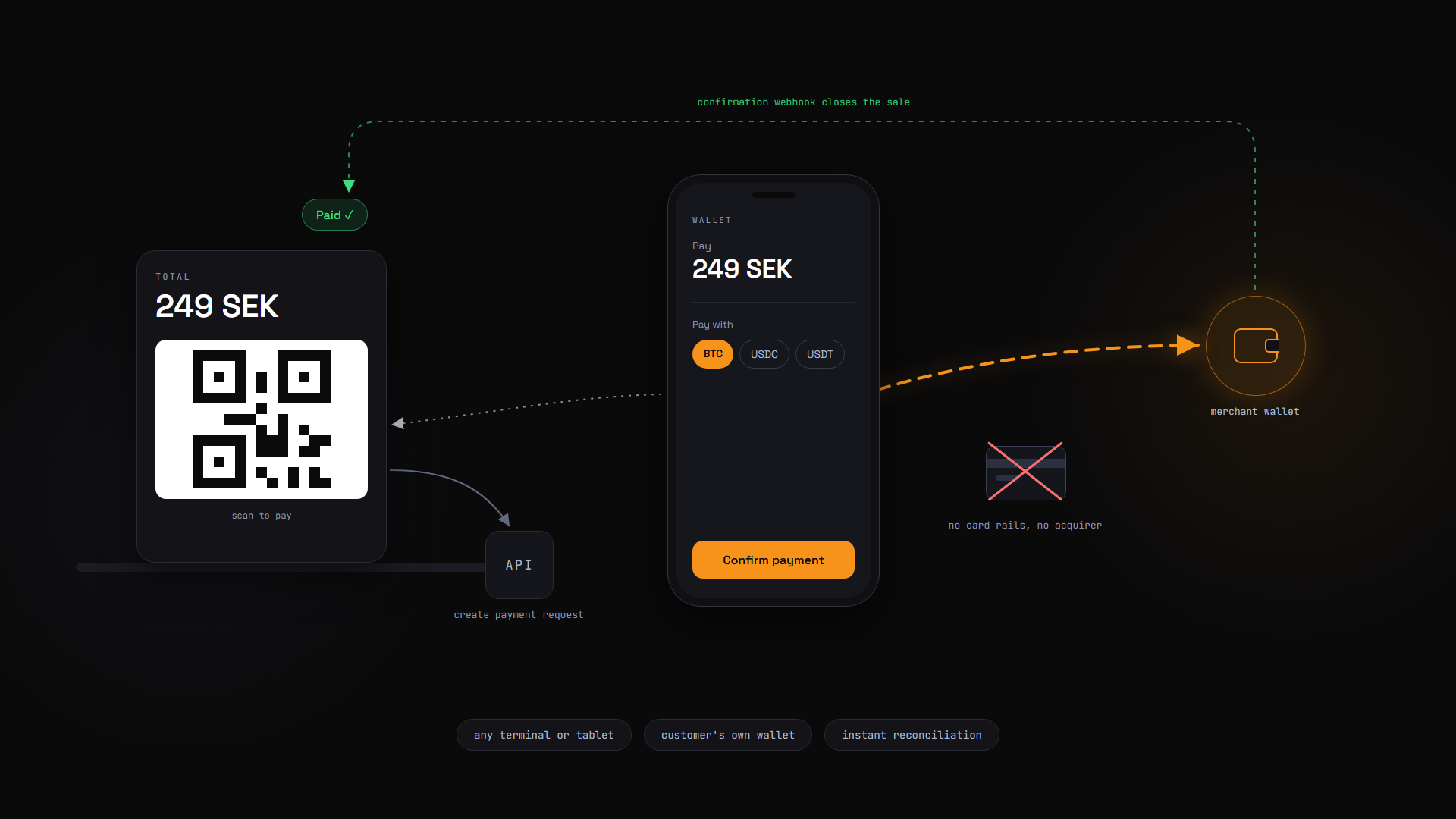
Any tablet, terminal or kiosk can show the QR code for the basket total. The customer pays from their own wallet and the confirmation webhook closes the sale. No card fees, and the money lands in your wallet.
For customers who send an AI agent
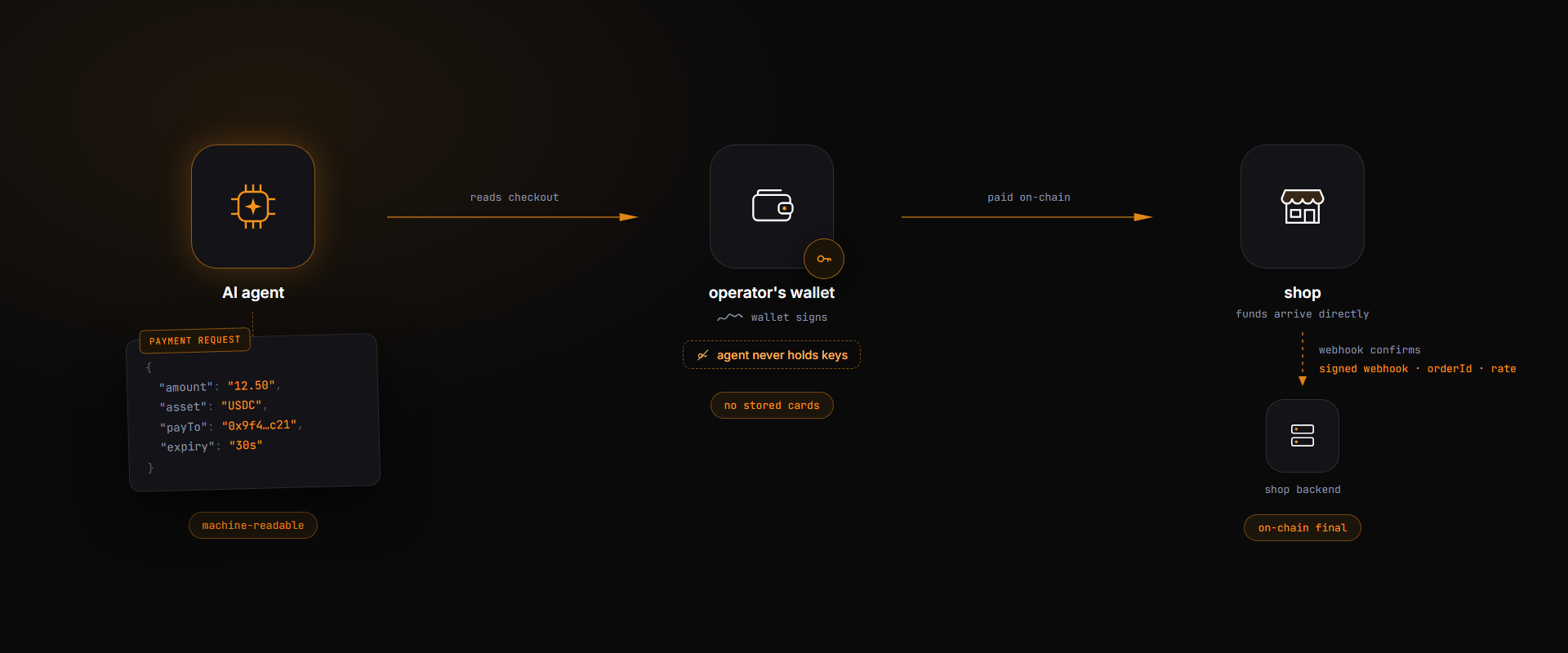
Every send21 checkout is machine-readable: structured JSON, standard payment links, /llms.txt, OpenAPI and an MCP server at send21.io/mcp. An agent can read your checkout, and the payment is signed in its operator's own wallet. No stored cards, no chargebacks. How it works.
How a checkout works
Create a payment request
With one API call, or a click in the dashboard. Set the price in any of 165 currencies and list the crypto you accept, each with your own receiving address. You get a hosted pay link and QR code back.
curl -X POST https://send21.io/api/v1/payment-requests \
  -H "Authorization: Bearer s21_yourkey" \
  -H "Content-Type: application/json" \
  -d '{
    "fiatCurrency": "EUR",
    "fiatAmount": 49.90,
    "orderId": "shop-order-1042",
    "memo": "Order #1042 Blue hoodie",
    "options": [
      { "currency": "Btc",  "network": "Mainnet",  "address": "bc1q..." },
      { "currency": "Usdc", "network": "Solana",   "address": "5Gv7..." },
      { "currency": "Usdt", "network": "Ethereum", "address": "0xAb..." }
    ]
  }'
Show the pay page or QR code
Redirect to the hosted page, put the link in an invoice, or show the QR at the counter. The customer picks BTC (on-chain or Lightning), USDC, USDT, EURC, SOL or ETH. The rate locks for 15 minutes the moment they choose, so you get the price you asked for.
The customer pays from their own wallet
One standard QR code (BIP-21, Solana Pay or EIP-681) that ordinary wallets understand. The money goes straight from the customer's wallet to your address.
Get a webhook with everything your books need
When the payment confirms, the signed webhook tells you what was paid, what it was worth in your currency, the exact rate and your own order id.
{
  "event": "draft.confirmed",
  "data": {
    "draftId": "7d21...",
    "status": "Confirmed",
    "txId": "3QzV...",
    "confirmations": 1,
    "sentCurrency": "USDC",
    "network": "Solana",
    "sentAmount": "53.870000",
    "fiatCurrency": "EUR",
    "fiatAmount": 49.90,
    "conversionRate": 0.9263,
    "rateSource": "coinbase",
    "orderId": "shop-order-1042"
  }
}
Using Shopify? Connect your store with a custom app
There is no send21 app in the Shopify App Store. You connect your store by creating your own custom Shopify app. We provide the reference code and help you set it up. You need someone who can host a small web service.
Once connected, the customer picks "Crypto (send21)" at checkout, gets the pay link in the order email and pays from their own wallet. The order is marked paid when the payment confirms. Your theme's checkout code is not touched.
Create a send21 API key and webhook
Create an API key with
drafts:readanddrafts:write. Save your receiving addresses in the address book as "My own, I receive here". Add a webhook fordraft.confirmedthat points at your app.Create and host your custom app
Create a custom app for your store in the Shopify Partner Dashboard and run the connection code on a public HTTPS address you control. Install it on your store and approve the order permissions (
read_orders,write_orders). It then picks up new orders on its own.Add the manual payment method
In Shopify admin, open Settings, then Payments, then Manual payment methods. Create "Crypto (send21)" and add the pay link snippet to your order confirmation email. Each order is then marked paid as soon as its payment confirms.
For the reference code, setup help and the email snippet, write to integration@send21.io. Crypto payments cannot be pulled back by the shop: to refund, send the money from your own wallet, then refund the order in Shopify admin. There is no ready-made WooCommerce plugin; other carts can use the same payment-request API.
Why shops choose send21
No custody
Customers pay your addresses directly. send21 never holds your money, so it can never freeze or lose it.
Price in your currency
You ask for €49.90 and the customer pays exactly that value, at a locked rate recorded on the payment.
One-scan checkout
One QR code that ordinary wallets understand. No crypto know-how needed.
Ready for your books
Each signed webhook carries the currency and amount paid, its value in your currency, the rate and your order id.
Low fees, never taken from the sale
From 0.49% on small payments down to 0.01%, capped at $100. The fee is billed to your account, and you settle it in one payment in BTC, USDC, USDT, EURC, SOL or ETH. Pricing.
AI agents can buy from you
The whole checkout is machine-readable, so an AI agent shopping for its owner can use it. How it works.
Ready for customers who shop with an AI agent
Card checkouts break for agents: handing an agent a card number is risky and filling in forms is fragile. A send21 checkout is a machine-readable payment instruction. The agent reads it, checks it and has it paid from its operator's own wallet. Nobody shares a card number or a private key.
Machine-readable checkout
Every payment request returns structured JSON and standard payment links (BIP-21, Solana Pay, EIP-681). It is the same data that powers the pay page people see.
Easy for agents to find
/llms.txt and an OpenAPI spec describe the whole flow in the format AI agents look for.
Safe for everyone
The agent's operator controls the paying wallet, and you receive at your own address. No stored cards, no credentials to leak, no chargebacks.
Reconciliation built in
Your orderId comes back in the signed confirmation webhook with the exact amount and rate, so agent orders book like any other order.
The agent places an order
Your backend creates a payment request for it.
The agent reads the payment options
It picks a currency, and the payment is signed in its operator's wallet.
A signed webhook confirms the payment
It carries your order id, so you can ship.
Nothing extra to build. The payment request that shows a QR code to a person is the same one an agent reads.
Person-to-person requests too
The same flow works between people. Create a request for what a friend owes you, send the link, and they pay in any currency you offer, from their own wallet.
Start accepting crypto today
Free account, no subscription. Questions about your shop or agent? Write to integration@send21.io.